English

How to Download Pinterest Videos

A simple guide for Android, iPhone, iPad, Windows and Mac.

Download Pinterest videos on any device

Pinterest lets you save Pins to boards, but it does not offer a download button for most videos. With SavePinNow you can keep a copy on your device in three steps. Below you will find the exact steps for each platform.

On Android

  1. Open the Pinterest app and find the video.
  2. Tap the Share icon and choose Copy link.
  3. Open savepinnow.com in Chrome, paste the link and tap Download.
  4. Pick a quality. The video is saved to Downloads and appears in your Gallery.

On iPhone and iPad

  1. In the Pinterest app, tap Share and then Copy link.
  2. Open savepinnow.com in Safari, paste the link and tap Download.
  3. Choose a quality and confirm the download.
  4. Open Files > Downloads, tap the video, then Share > Save Video to add it to Photos.

On Windows, Mac and Linux

  1. Open the Pin on pinterest.com and copy the URL from the address bar.
  2. Paste it on savepinnow.com and click Download.
  3. Click the quality you want. The file goes to your Downloads folder.
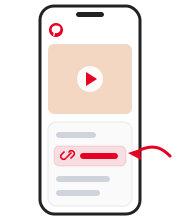
How to download from Pinterest in 3 steps

Copy the Pin link

Copy the Pin link

Open the Pin in the Pinterest app or website, tap the Share (or ⋯) button and choose Copy link.

Paste the link

Paste the link

Come back to SavePinNow, paste the link into the box at the top of the page and press Download.

Save the file

Save the file

Choose the quality you want (720p, 1080p or higher when available) and the file is saved to your device.

Frequently Asked Questions

Why does Pinterest not have a download button for videos?

Pinterest focuses on saving Pins to boards inside its app. Downloading for offline use requires a tool like SavePinNow.

Can I download a whole Pinterest board?

SavePinNow works Pin by Pin. Open each Pin and paste its link.

The download opens the video in a new tab instead of saving. What do I do?

Long-press (mobile) or right-click (desktop) the video and choose Download or Save video as.

Is SavePinNow free?

Yes, it is completely free with no limits and no registration.

Do I need to install an app or extension?

No. SavePinNow works in any web browser on phones, tablets and computers.

Where are downloaded files saved?

In your browser's default download location, usually the Downloads folder. On iPhone check Files > Downloads.

Does SavePinNow keep a copy of my downloads?

No. We do not host or store Pinterest media. Files come directly from Pinterest's CDN.

More free Pinterest tools

Rate this tool

Tap a star to tell us how SavePinNow worked for you.

No ratings yet. Be the first to rate!